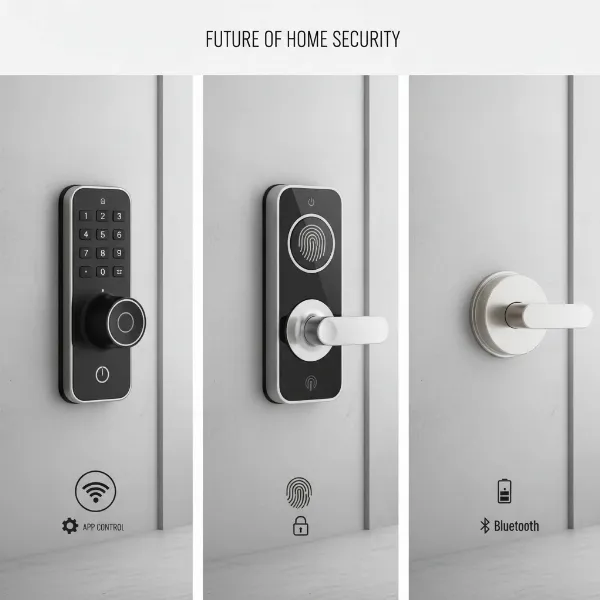
As an administrator of reviewpado.com, a technician with over a decade of deep expertise in smart door locks, I’ve personally worked with hundreds of models from renowned brands to emerging products. My profound understanding of technology, features, and common issues is dedicated to helping you select the perfect, most secure smart lock for your home. With the rise of smart home technology, securing your property has evolved beyond traditional keys. Smart door locks offer a blend of advanced security, unparalleled convenience, and intelligent management capabilities, transforming how we protect our living spaces. This comprehensive guide aims to demystify the world of smart door locks, equipping you with the knowledge to make an informed decision for your modern security needs.
What is a Smart Door Lock? Why Should You Use One?
A smart door lock is an electromechanical lock designed to perform locking and unlocking operations on a door when it receives instructions from an authorized device using a wireless protocol. Unlike traditional locks that rely solely on physical keys, smart locks integrate with smart home systems, offering remote access and monitoring capabilities. These innovative devices redefine home security by providing a digital layer of protection and control.
The primary benefits of using a smart door lock are manifold. Firstly, enhanced security is paramount, with features like tamper alerts, automatic locking, and robust encryption protecting against unauthorized access. Secondly, convenience is significantly improved; you can unlock your door with a fingerprint, a code, a smartphone app, or even voice commands, eliminating the need for physical keys. Finally, remote management allows you to grant temporary access to guests, check door status, and monitor activity from anywhere in the world, ensuring peace of mind whether you’re at work or on vacation. Common use cases include residential homes, vacation rentals, offices, and even apartment buildings, where controlled and flexible access is a key requirement.
Popular Types of Smart Door Locks on the Market
The smart door lock market is diverse, offering a variety of types categorized by their unlocking methods, connectivity, and design. Understanding these distinctions is crucial for selecting a lock that aligns with your specific security and lifestyle needs.
By Unlocking Method
Smart locks provide multiple ways to grant or deny entry, moving beyond the simple key.
- Fingerprint Recognition: Offers quick, keyless entry by scanning a registered fingerprint. This method is highly secure and convenient, eliminating the need to remember codes or carry keys.
- Keypad Entry (Passcode): Users unlock the door by entering a numerical code on a touchscreen or physical keypad. This is popular for shared access, allowing easy code changes for different users.
- RFID Card/Fob: Utilizes radio-frequency identification tags, similar to hotel key cards, for a quick tap-to-unlock experience. Ideal for environments where physical cards are preferred.
- Smartphone App Control: Allows users to lock and unlock doors, manage access, and monitor activity directly from their smartphone via a dedicated app. This offers maximum convenience and remote control.
- Traditional Key Override: Many smart locks retain a traditional keyhole, providing a mechanical backup in case of battery failure or system malfunction, ensuring you’re never locked out.
|
Our Picks for the Best Smart door lock in 2026
As an Amazon Associate I earn from qualifying purchases.
|
||
| Num | Product | Action |
|---|---|---|
| 1 | TEEHO TE001 Keyless Entry Door Lock with Keypad - Smart Deadbolt Lock for Front Door with 2 Keys - Auto Lock - Easy Installation - Satin Nickel |

|
| 2 | Veise VE017 Fingerprint Smart Door Lock, App Control, 8-in-1 Keyless Entry, Auto Lock, Emergency Power Port, Electronic Touchscreen Keypad, Biometric Smart Locks for Front Door, Matte Black |
|
| 3 | Smart Door Handle Lock with Keypad: Yamiry Fingerprint Smart Knob - Keyless Entry Digital Lock for Front Door - Deadbolt with APP - Generate Passcode Remotely - DIY Installation |
|
| 4 | Philips Wi-Fi Door Lock, WiFi Smart Lock Keyless Entry Deadbolt for Front Door, Compatible with Alexa & Google Assistant, Remote Control, Built-in WiFi, APP Fingerprint Passcode Unlock, Auto Locking |
|
| 5 | eufy Security Smart Lock C30, Keyless Entry Door Lock, Built-in WiFi Keypad Deadbolt for Front Door, No Bridge Required, Easy Installation, App Remote Control, Reliable Power, BHMA Grade 3 |
|
| 6 | TEEHO TE001 Keyless Entry Door Lock with Keypad - Smart Deadbolt Lock for Front Door with 2 Keys - Auto Lock - Easy Installation - Matte Black |
|
| 7 | Philips WiFi Keypad Door Lock with Handle, Built-in WiFi, APP Remote Control, Voice & Fingerprint Unlock, Smart Locks for Front Door with Auto Lock, Digital Front Door Lock Set, Keyless Entry Deadbolt |
|
| 8 | Keypad Smart Door Lock with Knob, Yamiry Keyless Entry Digital Lock with Handle, Fingerprint Electronic Knob for Front Door |
|
| 9 | eufy Security Smart Lock C220, Fingerprint Keyless Entry Door Lock, Built-in Wi-Fi, App Remote Control, Front Door Smart Lock Deadbolt, 8Months Battery, Reliable Power, IP53 Waterproof, BHMA Grade 3 |
|
| 10 | Schlage Encode Smart Wi-Fi Deadbolt Lock with Touchscreen Keypad, Keyless Front Door Entry, App Control, Alexa, Google Home and Airbnb Compatible, Matte Black, BE489WB CEN 622 |
|
By Connectivity
The connectivity method determines how your smart lock communicates with other devices and your smart home system.
- Bluetooth: Connects directly to your smartphone within a short range, offering local control. It’s energy-efficient but lacks remote access without a bridge device.
- Wi-Fi: Connects directly to your home’s Wi-Fi network, enabling remote control and integration with cloud services. This offers the most extensive remote access but can consume more battery.
- Z-Wave: A low-power wireless communication protocol designed for smart home devices, offering reliable communication over longer distances than Bluetooth and creating a mesh network. Requires a Z-Wave hub.
- Zigbee: Another mesh networking protocol similar to Z-Wave, known for its efficiency and scalability in larger smart home ecosystems. Also requires a Zigbee hub.
By Design
Smart lock designs vary to suit different door types and aesthetic preferences.
- Lever/Knob Style Smart Locks: These replace existing door handles or knobs and often integrate the keypad or fingerprint reader directly into the design, offering a sleek, all-in-one solution.
- Deadbolt Style Smart Locks: These replace only the deadbolt mechanism, often retaining the existing handle. They are popular for their robust security and ability to blend seamlessly with existing door hardware.
- Keyless Entry for Glass Doors: Special designs cater to glass doors, often using adhesive or clamp-on mechanisms that don’t require drilling, providing smart access solutions for modern office or storefront environments.
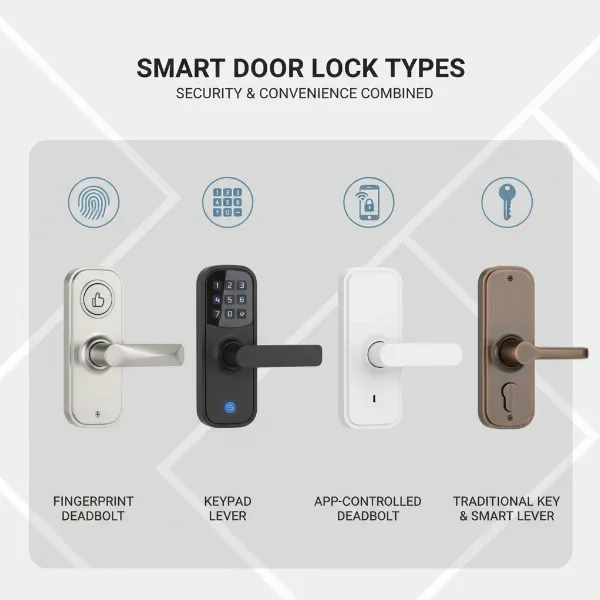 Different types of smart door locks illustrating various unlocking methods and designs
Comparing Top Smart Door Lock Brands
Choosing the right smart door lock often comes down to the brand’s reputation for innovation, security, and user experience. Several manufacturers stand out in the market, each with unique strengths.
| Brand | Price Range | Key Features | Security Level | Durability | Support |
|---|---|---|---|---|---|
| Samsung | Mid-High | Fingerprint, Pincode, RFID, Push-Pull design, IoT integration | High | Excellent | Good |
| Yale | Mid-High | Keypad, App control, Z-Wave/Zigbee, Auto-lock, Voice assistant | High | Excellent | Very Good |
| Philips | Mid | Fingerprint, Pincode, App control, Privacy mode, Anti-peep | High | Good | Good |
| Schlage | Mid-High | Keypad, Touchscreen, Z-Wave/Zigbee, Built-in alarm, Apple HomeKit | Very High | Excellent | Excellent |
| August | Mid | Retrofit design, App control, Virtual keys, DoorSense | High | Good | Good |
| Xiaomi | Low-Mid | Fingerprint, Pincode, Bluetooth/Zigbee, Smart home ecosystem | Medium-High | Good | Moderate |
| Kwikset | Mid | Keypad, Z-Wave, SmartKey re-key technology, Auto-lock | High | Good | Good |
- Samsung Smart Locks are renowned for their sleek, modern designs, often featuring a convenient push-pull handle and advanced biometric recognition. Their integration with Samsung’s SmartThings ecosystem makes them a strong choice for existing Samsung users.
- Yale Smart Locks offer a robust balance of traditional lock expertise and smart technology. Their products are often lauded for their reliability, durability, and broad compatibility with various smart home platforms like Apple HomeKit, Google Assistant, and Amazon Alexa.
- Philips Smart Locks emphasize ease of use and aesthetic appeal, often incorporating features like anti-peep passcode entry and robust fingerprint scanners, catering to users who prioritize both security and design.
- Schlage Smart Locks are a top contender for those prioritizing maximum security and durability. Their BE469ZP and Encode series are consistently rated highly for their robust construction, advanced security features, and seamless integration capabilities with Z-Wave and Wi-Fi.
- August Smart Locks stand out for their unique retrofit design, which allows them to be installed over an existing deadbolt on the inside of the door, preserving the exterior look. Their focus on virtual keys and automatic unlock/lock features makes them incredibly convenient.
- Xiaomi Smart Locks provide a more budget-friendly option without completely sacrificing features. They often integrate well within the Xiaomi smart home ecosystem and offer a good range of unlocking methods, making them accessible to a wider audience.
- Kwikset Smart Locks are known for their user-friendly design and proprietary SmartKey re-key technology, which allows homeowners to re-key the lock themselves in seconds. They offer solid performance and good value.
Top Smart Door Lock Models Available Today
Selecting the best smart door lock can be challenging with so many options. Here’s a comparison of at least five top-rated models, highlighting their key features and what makes them stand out.
| Model | Price Range | Unlocking Methods | Special Features | User Rating (1-5) |
|---|---|---|---|---|
| Schlage Encode Plus | High | Keypad, App, Apple Home Key | Wi-Fi built-in, Apple Home Key, Alarm | 4.7 |
| Yale Assure Lock 2 Touch | Mid-High | Fingerprint, Keypad, App, Key | Auto-lock, DoorSense, Multiple finish options | 4.6 |
| August Wi-Fi Smart Lock | Mid | App, Virtual Keys, Key | Retrofit design, DoorSense, Auto-Unlock/Lock | 4.5 |
| Samsung SHP-DP609 | High | Fingerprint, Pincode, RFID, App | Push-Pull, Wi-Fi, Motion sensor, Smart Home Ready | 4.4 |
| ULTRALOQ U-Bolt Pro WiFi | Mid | Fingerprint, Keypad, App, Key, Voice | Bridge-free Wi-Fi, Magic Shake to Open, Auto-lock | 4.3 |
| Philips DDL702E | Mid | Fingerprint, Pincode, App | Push-Pull handle, Privacy mode, Anti-peep | 4.2 |
- Schlage Encode Plus: This lock is a powerhouse, offering built-in Wi-Fi and the innovative Apple Home Key feature, allowing you to unlock your door by simply tapping your iPhone or Apple Watch. It also includes an integrated alarm for added security.
- Yale Assure Lock 2 Touch: A highly versatile lock that boasts a responsive fingerprint scanner for quick entry, a traditional keypad, and app control. Its sleek design and robust build make it a favorite for homeowners seeking both style and security.
- August Wi-Fi Smart Lock: Ideal for renters or those who want to keep their existing deadbolt’s exterior appearance. This lock offers seamless auto-unlock and lock features, virtual key sharing, and DoorSense technology to confirm your door is closed and locked.
- Samsung SHP-DP609: With its distinctive push-pull handle design, this lock offers a luxurious and convenient entry experience. It integrates various unlocking methods, including a fast fingerprint scanner, and connects directly to Wi-Fi for remote management and smart home integration.
- ULTRALOQ U-Bolt Pro WiFi: This model stands out for its 6-in-1 unlocking versatility, including a rapid fingerprint sensor and bridge-free Wi-Fi connectivity. Its “Magic Shake to Open” feature for smartphone users adds a unique convenience.
- Philips DDL702E: Another strong contender in the push-pull category, this Philips lock combines sophisticated aesthetics with practical security features like a robust fingerprint module and an anti-peep function for passcode entry.
Guide to Choosing the Right Smart Door Lock
Selecting the perfect smart door lock involves more than just picking a popular model. It requires a careful assessment of your specific needs, budget, and existing home setup.
Determine Your Usage Needs
Consider who will be using the lock and how.
- For families: Prioritize ease of use for all ages, with multiple unlocking methods like fingerprint and keypad, and robust security features like auto-lock.
- For offices or rental properties: Look for features like remote access management, temporary code generation, and activity logs to monitor entry and exit efficiently.
- For smart home enthusiasts: Ensure compatibility with your existing smart home ecosystem (e.g., Apple HomeKit, Google Home, Amazon Alexa, SmartThings) for seamless integration and automation.
Establish Your Budget
Smart locks vary widely in price, from budget-friendly options under $100 to premium models exceeding $400.
- Entry-level locks often provide basic keypad or Bluetooth functionality.
- Mid-range locks introduce Wi-Fi or Z-Wave/Zigbee connectivity, fingerprint scanning, and more robust build quality.
- High-end locks offer advanced features like video integration, facial recognition, and premium materials, alongside seamless smart home integration. Define what features are essential versus desirable to align with your financial comfort zone.
Essential Features to Consider
Beyond basic locking and unlocking, certain features can significantly enhance your experience.
- Biometric Scanning (Fingerprint): For ultra-fast, keyless, and highly secure entry.
- Remote Access and Control: Allows you to lock/unlock from anywhere, grant temporary access, and monitor activity via a smartphone app.
- Auto-Lock/Unlock: Locks automatically after a set period or when you leave, and unlocks when you approach, adding convenience and security.
- Voice Assistant Integration: For hands-free control via devices like Amazon Alexa or Google Assistant.
- Tamper Alarms: Alerts you to forced entry attempts or tampering with the lock.
- Privacy Mode: Disables external access methods from the inside for enhanced security.
Check Door Type and Thickness
Not all smart locks fit all doors.
- Standard doors: Most smart locks are designed for standard residential doors with a thickness typically between 1 3/8 inches and 2 inches.
- Door material: Ensure the lock is compatible with your door’s material (wood, metal, fiberglass).
- Backset and bore hole: Verify your door’s backset (distance from door edge to center of bore hole) and bore hole diameter match the lock’s requirements. Some locks require larger bore holes.
- Handle vs. Deadbolt: Decide if you need a full handle/knob replacement or just a smart deadbolt to go with your existing handle.
Choose a Reputable Brand with Good Support
A smart lock is a long-term investment in your home’s security.
- Brand reputation: Opt for brands known for reliability, security, and innovation.
- Warranty: Check the warranty period and what it covers.
- Customer support: Good customer service is crucial for installation help, troubleshooting, and general inquiries. Look for brands with accessible support channels (phone, email, online resources).
Installation and Usage Guide for Smart Door Locks
Installing and setting up your smart door lock might seem daunting, but most modern locks are designed for DIY installation. Proper setup and maintenance will ensure optimal performance and longevity.
Necessary Tools
Before you begin, gather these common tools:
- Phillips head screwdriver
- Measuring tape
- Pencil
- Drill (only if replacing a non-standard lock or creating new holes)
- Chisel (if mortising for the strike plate)
Basic Installation Steps
While specific steps vary by model, the general process is similar:
- Remove Existing Hardware: Unscrew and remove your old deadbolt and any associated hardware from the door.
- Install New Latch/Bolt: Insert the new smart lock’s latch or bolt into the bore hole on the edge of the door, ensuring it’s correctly oriented (faceplate flush with door edge).
- Install Exterior Assembly: Mount the exterior keypad or fingerprint reader assembly onto the door, threading the connecting cable through the door’s bore hole to the interior side.
- Install Interior Assembly: Connect the cable from the exterior assembly to the interior assembly. Secure the interior assembly to the door using screws, ensuring it’s level and snug.
- Install Batteries: Insert the required batteries into the interior unit, typically AA or AAA.
- Test Operation: Manually check the lock and unlock mechanism. Ensure the bolt extends and retracts smoothly.
- Install Strike Plate: Affix the new strike plate to the door frame, ensuring it aligns perfectly with the bolt.
Setting Up and Using Features
After physical installation, you’ll need to configure the lock:
- Download App: Download the manufacturer’s dedicated smartphone app.
- Pair Lock: Follow the app’s instructions to pair your smart lock via Bluetooth, Wi-Fi, or your smart home hub.
- Set Passcodes/Fingerprints: Create your master passcode, and then add user passcodes or register fingerprints for family members.
- Configure Features: Set up auto-lock timers, enable remote access, integrate with voice assistants, and customize alerts as desired.
- Share Access: Use the app to generate temporary codes or virtual keys for guests or service providers, setting specific validity periods.
Maintenance Tips
- Battery Replacement: Smart locks will notify you when batteries are low. Replace them promptly (typically every 6-12 months) to avoid being locked out. Use high-quality alkaline batteries.
- Clean Keypad/Sensor: Regularly wipe down keypads and fingerprint sensors with a soft, damp cloth to remove dirt and grime, ensuring accurate recognition.
- Software Updates: Keep the lock’s firmware updated via the app to ensure you have the latest security patches and features.
- Lubrication: Occasionally apply a graphite-based lubricant (never oil-based) to the bolt mechanism to ensure smooth operation, especially if you have a mechanical key override.
Common Problems and Solutions with Smart Door Locks
While smart door locks offer immense convenience, users can occasionally encounter issues. Knowing how to troubleshoot these problems can save you time and frustration.
Sudden Battery Depletion
- Problem: The lock’s batteries die unexpectedly, leaving you unable to unlock it electronically.
- Solution: Most smart locks include a traditional key override or external battery terminals where you can temporarily connect a 9V battery to power it up for entry. Always replace batteries proactively when low-battery warnings appear.
Forgotten Passcode or Lost RFID Card
- Problem: You’ve forgotten your entry code, or a registered RFID card is lost or stolen.
- Solution: Access your smart lock’s mobile app to retrieve or reset passcodes. For lost RFID cards, simply revoke access for that specific card through the app and issue a new one if needed. Some locks allow you to reset the master code directly on the lock’s keypad if you have physical access.
Fingerprint Sensor Not Recognizing
- Problem: The fingerprint sensor fails to recognize registered fingerprints.
- Solution: First, ensure the sensor is clean and free of dirt or moisture. Try re-registering your fingerprint, making sure your finger is clean and dry during the process. Ensure proper placement of your finger on the sensor as per the manufacturer’s instructions. Extreme temperatures or very dry/oily skin can sometimes affect recognition.
Connectivity Issues
- Problem: Your smart lock loses connection to Wi-Fi or your smart home hub, preventing remote access or smart home automations.
- Solution:
- Check Wi-Fi signal: Ensure your router is working and the lock is within range. A Wi-Fi extender might be necessary.
- Restart devices: Try restarting your Wi-Fi router, smart home hub, and the smart lock itself (by removing and reinserting batteries).
- App troubleshooting: Check the lock’s app for connectivity status or troubleshooting guides.
- Firmware update: Ensure both your router and smart lock have the latest firmware.
“Smart locks are evolving rapidly, offering unparalleled convenience and security. But remember, the best lock is one that’s properly installed and maintained, ensuring it works seamlessly when you need it most.” – Sarah Chen, Senior Smart Home Technician at SecureTech Solutions
Conclusion
Embracing a smart door lock is a significant step towards enhancing your home’s security, convenience, and overall smart living experience. From the effortless entry provided by fingerprint scanners and keypads to the peace of mind offered by remote access and monitoring, these devices truly transform how we interact with our homes. By considering your specific needs, understanding the various types and features available, and opting for a reputable brand, you can confidently choose the best smart door lock for your modern security requirements. Don’t let the complexity deter you; with the right information, securing your home intelligently has never been easier. What steps will you take to upgrade your home security with a smart lock today?
Frequently Asked Questions
How long do smart door lock batteries last?
Most smart door lock batteries last between 6 to 12 months, depending on usage frequency, lock model, and battery quality. You’ll typically receive low-battery warnings well in advance.
Can smart door locks be hacked?
While any connected device carries some risk, reputable smart door locks use advanced encryption and security protocols to prevent hacking. Keeping firmware updated and using strong passcodes significantly reduces vulnerability.
Do smart locks work without Wi-Fi?
Yes, many smart locks function perfectly without Wi-Fi for basic locking and unlocking via keypad, fingerprint, or Bluetooth. However, remote access and smart home integrations usually require a Wi-Fi connection or a compatible hub.
What happens if the power goes out?
Smart locks primarily run on batteries, so a power outage will not affect their operation. If the batteries die, most models include a mechanical key override or a way to temporarily jump-start the lock with an external battery.
Are smart locks compatible with all doors?
Smart locks are designed for standard residential doors, but it’s crucial to check your door’s thickness, backset, and bore hole dimensions against the lock’s specifications before purchase to ensure compatibility.
Is professional installation required for smart door locks?
Most smart door locks are designed for DIY installation and can be installed with basic tools in under an hour. However, if you’re uncomfortable with the process or your door requires modifications, professional installation is an option.
Can I grant temporary access to guests?
Yes, a key feature of most smart door locks is the ability to generate temporary or time-sensitive passcodes or virtual keys via the smartphone app, which is ideal for guests, cleaners, or service providers.